WRITTEN ARTICLE · PROFESSION ADDON SETUP
WoW Forever profession addon: Recipe Registry setup and missing recipes
Set up Recipe Registry for WoW Forever, find guild crafters and check missing recipes. A practical profession addon guide for your next leveling session.
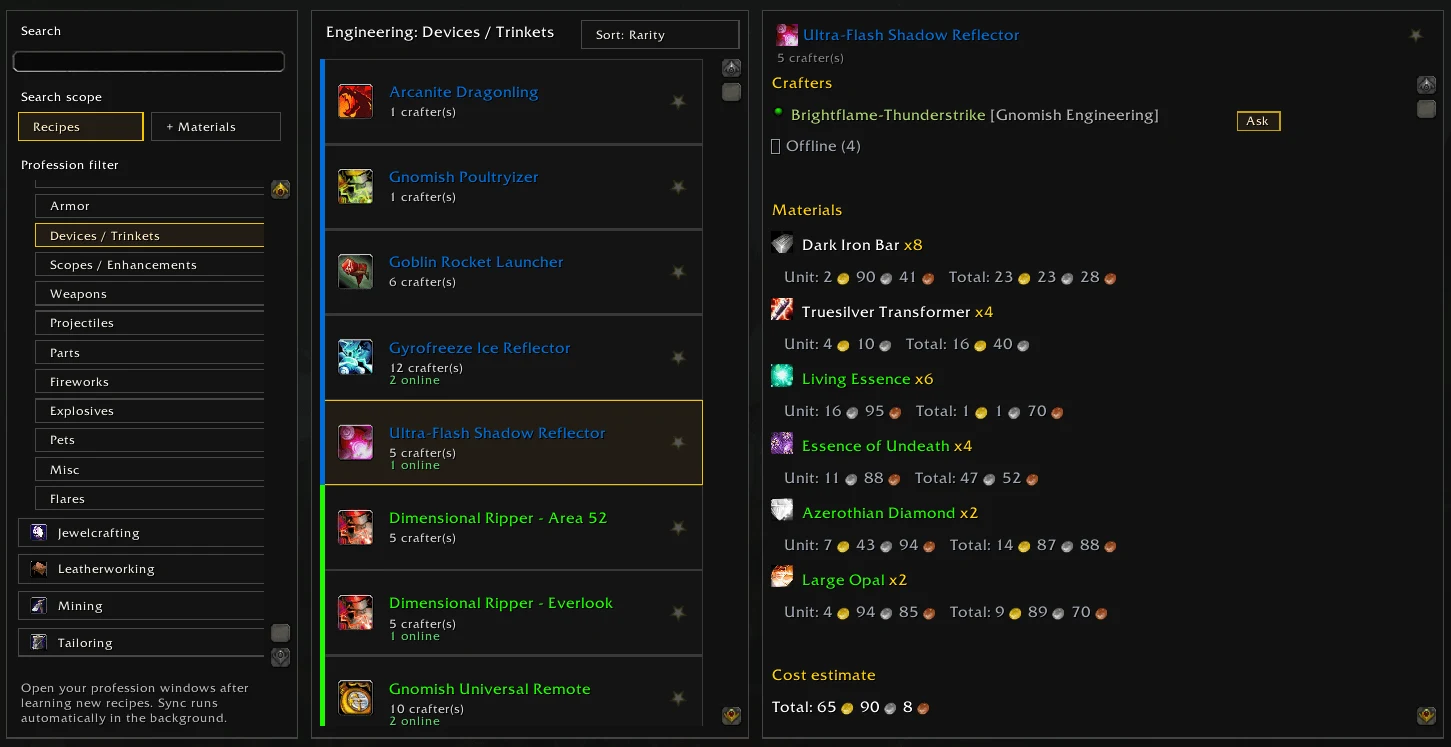
Recipe Registry screenshot by Kaedros, from the project’s CurseForge gallery. Game imagery © Blizzard Entertainment.
Find a recipe and the guildmate who can make it
Recipe Registry now has a dedicated WoW Forever build. It lets you look through your profession recipes, check what you are missing and find guildmates who know a particular craft. Its first Forever release arrived on September 25.
For a character still leveling, the useful question is often quite small. Can someone make the item you need, and what should you bring them? A shared recipe directory puts that information somewhere you can check before spending your materials.
The team reports a Forever database of 2,519 recipes across 12 professions. That is the project’s database count, not a promise that every recipe has a verified acquisition location.
How to set up Recipe Registry for Forever
Start with the Forever release linked below. The project also supports TBC, so check the game version before installing a file. For a manual installation, extract the release into the AddOns directory of the client you actually launch and keep the supplied folder name.
- Open each profession window once so the addon can scan your recipes.
- Type /rr or use the minimap button to open Recipe Registry.
- Search for a recipe you already know to check that your character appears.
- Ask guildmates to install the matching build and scan their professions too.
- Allow time for the first guild sync, particularly with a large roster.
Use Collection to choose your next recipe
The Collection tab separates recipes you know from those you still need. It compares recipe requirements with your profession skill, helping you narrow the list to something you can learn now. Available source details can include trainers, vendors, drops, quests and map coordinates.
Our suggestion is to pick one useful recipe before leaving town. Check its materials, skill requirement and source, then compare the trip with the quests you already plan to do. A nearby trainer visit is easy to work into your return journey. A distant recipe can wait until you have another reason to travel there.
Keep the shopping list short. If the item is an upgrade, compare it with what you wear. If it is a consumable, think about how many you will actually use. Filling every gap in a collection is a different goal from preparing for tonight’s questing.
An offline crafter can still be worth finding
Guildmates running Recipe Registry share their known recipes. Previously synced information remains useful when the crafter is offline, and other synced players can pass that information along. The team says transfers pause inside instances, so a quiet directory during a dungeon is not automatically a fault.
Treat an offline result as someone to contact later. Check availability and agree on the materials before sending anything. If the list looks empty, first confirm that another guildmate has the addon and has opened their profession windows. An empty search does not prove nobody in the guild knows that craft.
Missing sources and price estimates need a second look
The Forever release notes flag incomplete learning sources, absent coordinates and potentially incorrect entries. Some recipes also have no known required skill value. Check the trainer, vendor or recipe in your current client before committing to a long trip.
TradeSkillMaster and Auctionator are optional. They supply market data for cost and profit estimates, while browsing and guild sharing work without them. A displayed margin depends on those prices being current. It does not guarantee that somebody will buy your finished item.
For an item you want to use yourself, compare buying the finished item with buying the missing materials. That simple check can be more useful than sorting the whole list by estimated profit.
Keep crafting stops with the rest of your journey
Use Recipe Registry to decide what you want to make and who can help. Then choose where the stop fits into your evening. Finish the nearby quest loop, return to town, and handle training, supplies and crafting in the same visit where practical.
For quest directions, Wisp’s free beta includes starting routes you can follow in game. The written routes are also available on the site. Recipe Registry is a separate project, and this guide does not describe an automatic connection between the two addons.
Related reading and guides
Sources and review notes
- Recipe Registry: Forever v0.1.0 release, September 25
- Recipe Registry team: Forever support, collection tracking and guild sync
- Recipe Registry project documentation and commands
- Recipe Registry author gallery on CurseForge
Based on the September 25 Forever release, project documentation and the team’s announcement. We have not playtested this addon. The screenshot shows the author’s earlier TBC interface.