
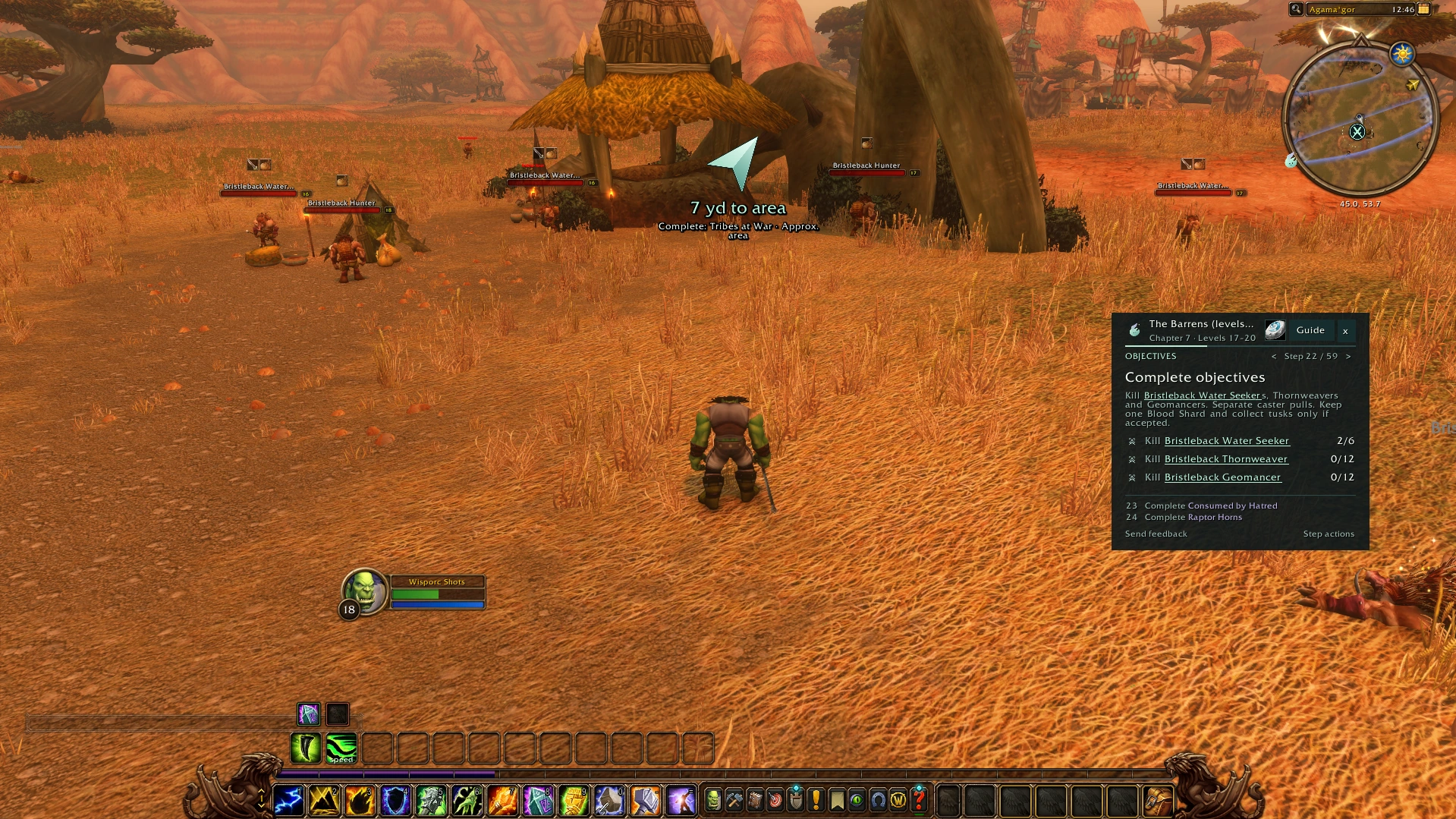
The familiar arrow.
Clear direction to your next objective, right in game.
FREE IN-GAME GUIDANCE
Wisp is a free WoW Forever leveling addon. Follow quest steps, directions and nearby objectives in game, with eight starter routes towards level 20.
Eight starter routes · No account needed
The beta has closed. Before playing at launch on 4 November, check the latest release and client requirements. Known issues
Watch Wisp in actionRecorded 27 September 2026 · 45 seconds · English captions. This recording shows the earlier beta interface.
Meet Wisp, your questing companion for WoW Forever. Choose your guide, and see the journey ahead, chapter by chapter.
Pick up your quests, then follow the arrow to your next stop. Your current objective stays beside you.
Nearby quests stay in view, so you can make the most of each trip. As you play, Wisp keeps track of your progress.
When you’re done, head back, collect your rewards, and continue into the next chapter. Less looking up. More Azeroth.
Try the free Wisp beta, with starting routes for both factions. Download it at foreverwisp.com.
Download the walkthroughFIND YOUR WAY
Follow your next step and keep nearby objectives in view.
Clear direction to your next objective, right in game.
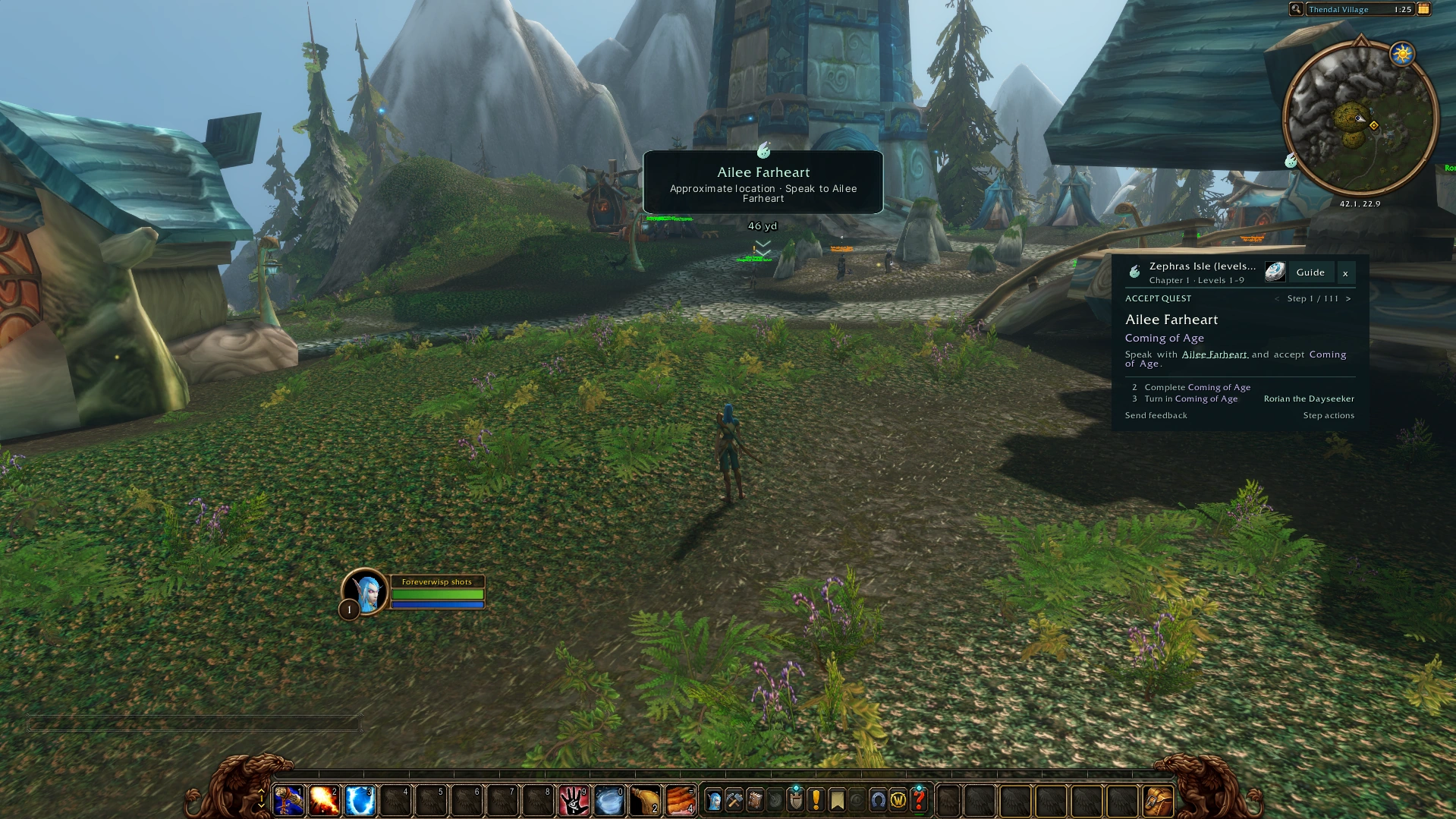
A marker for your guide’s destination, with more detail as you approach.
Choose the Wisp arrow, in-world marker, optional WaypointUI integration or no navigation display. Your guide keeps tracking your quests. Map pins and shaded search areas have separate controls.
The Wisp in-world marker currently requires WaypointUI to be disabled. With WaypointUI loaded, use its display or the Wisp arrow.
Nameplate icons and tooltips help identify enemies needed for unfinished quests, with objective progress when you hover over them. Compare WoW Forever leveling and quest addons.
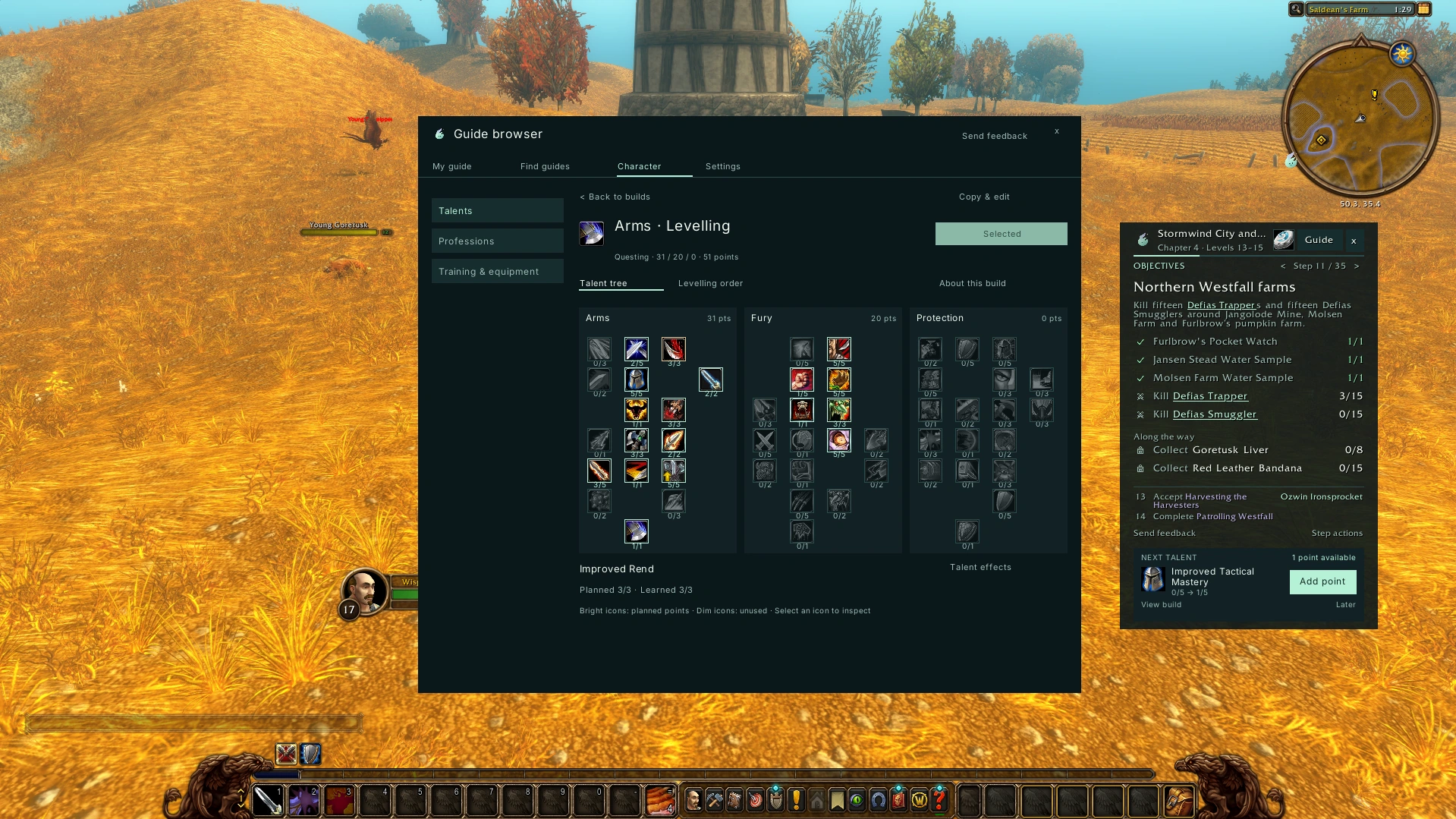
Create a talent plan and keep your next choice beside your guide.
Plan a custom build or review a suggested spending order. Wisp never spends points automatically. Suggested builds are beta theorycraft, not proven optimal builds.
Supported class quest routes and training stops help you follow your character’s unlocks alongside your journey.
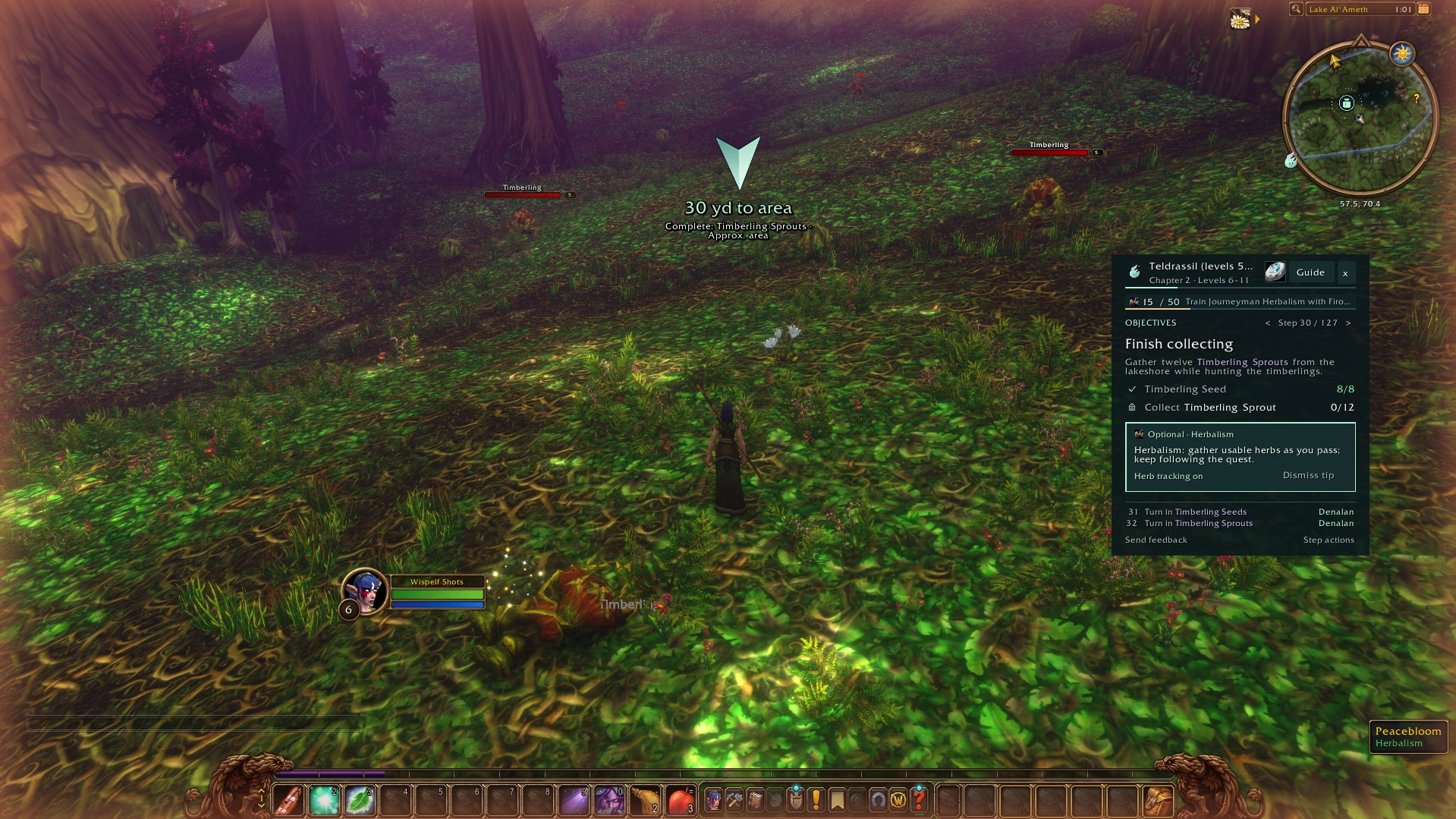
Supported trainer stops and gathering guidance alongside your route. Follow a profession guide on its own, too.
Explore gathering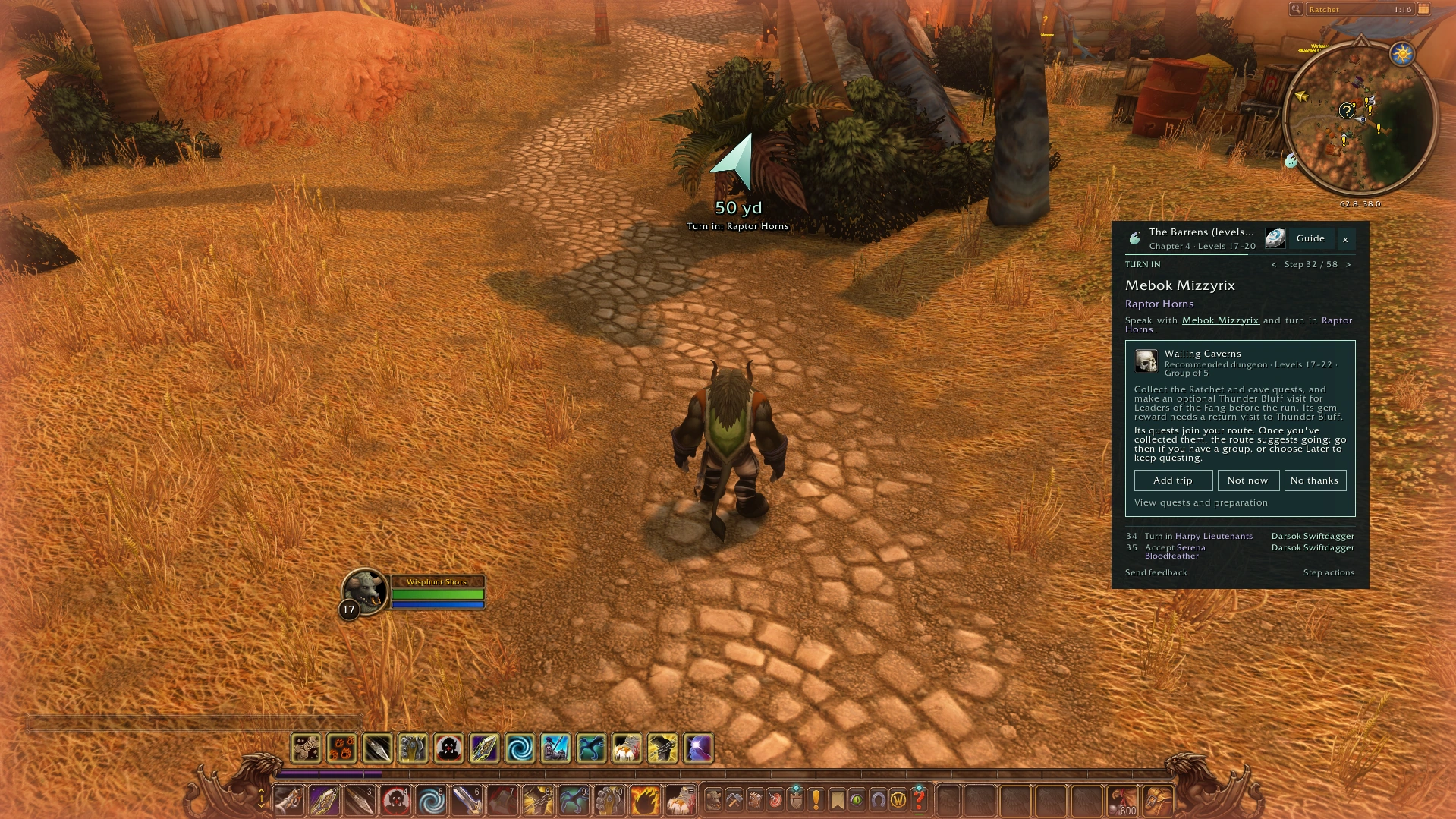
Choose a supported trip, prepare your quests and return to your route.
See how trips workShare objective progress with friends using Wisp. Everyone keeps their own progress.
Optional quest accept and turn-in assistance. Hold Shift to bypass; reward choices stay yours.
Adjust panel size, text and opacity, or switch to a compact layout.
INCLUDED FREE
Eight starter routes towards level 20. Free Mining, Herbalism and Skinning guidance through skill 150.
Explore guides beyond level 20Guide coverage, compatibility and the current beta.
Routes and XP pacing are being optimised and refined. Read the starter routes online.
The Alliance and Horde 20–35 guides are available as separate personal packs with a 20–60 pre-order or launch collection. Online reading is included. Later 35–60 bands arrive when released.
Mining, Herbalism and Skinning guides cover skill 1–300. Start free through skill 150, then choose an individual continuation or all three in the gathering pack. No levelling guide purchase required.
Crafting and attunement guides are planned. Raid access and attunement checklist · Release timeline
No. Wisp includes its own guide panel, quest steps and navigation; Questie is not a required addon. If you also want Questie’s map information, use a release for your Forever client and check the tracker and automatic quest settings in each addon. We have not verified every combination in game.
The current download was built for the WoW Forever beta, interface 16001. It is not a verified Retail or Classic Era release. Check the latest release and client requirements when Forever launches; the installation folder shown below is the beta example.
Read Wisp’s release notes · Check known issues and testing limits
BEFORE YOU PLAY
Between the beta closing on 21 October and launch on 4 November, WoW Forever can’t be played. You can still download Wisp and your guides; install them when the game launches. Here’s what we know about and are still refining.
Current testing limits
The new return-visit scheduling covers the reviewed Human, Orc & Troll and Horde Skyborne outings, with an Alliance Skyborne escort continuation. Automated replays simulate client observations; native offers, distances and full playthroughs remain unverified. Normal quest gates and manual controls still apply.
The distant beacon and screen-edge screenshots use staged placement and distances; the Kaltunk card is a live navigation capture. WaypointUI 1.7.3 is optional and installed separately. Wisp’s own marker requires WaypointUI disabled in AddOns; with it loaded, use the WaypointUI display or Wisp arrow. Personal destinations take priority; choose Follow Wisp to resume the guide.
Recommended builds are untested theorycraft. Live guidance requires a matching English Forever talent tree, using reference build 1.60.1.70338 reviewed on 13 October. Native WoW screenshots use simulated talent data. Native point purchases, physical-controller use and gameplay/build-quality acceptance remain unverified. Wisp keeps your saved plan when the live tree cannot be matched.
Library > Other starts lets you choose another starting route in your faction after accepting a warning. This is not recommended. You are likely to miss class quests, including pet unlocks. Some quests and profession stops may be unavailable. Reach the area yourself and review the starting point before switching. Each guide keeps its saved progress. Alternative race and zone combinations still need in-game validation.
These routes have been reviewed against online sources. Some late-game skill gains, spawn locations and connecting terrain remain provisional. Skill 300 is a profession target, not a character level. Later circuits enter hostile high-level areas; the guide does not make them suitable for a low-level character.
The free routes cover the starting journey towards level 20; separate pre-order packs cover 20–35. The 20–35 update adds ordinary questing and rebalances chapter order, but estimated XP gaps remain, especially before Horde levels 28–29. A low-grind solo journey is not yet established. Full playthroughs, native offers and XP tuning remain in progress. Extra quests or kills may be needed. Level checks show your actual XP and let you continue.
Wisp advances supported transport directions when you reach the destination zone, including alternate arrivals inland. Onward arrows and instructions may appear before the vessel docks: stay aboard until docking. Map arrival does not establish that it is safe to disembark. Current-client travel, loading behavior and approximate dock markers still need in-game checks.
Some markers identify a cave, collection region or approximate search area rather than an exact object. Follow the written directions and live quest objectives, and report a marker that sends you to the wrong place.
The source-reviewed Alliance Skyborne Aquatic Form chain and island Warrior stance lesson are included, alongside an optional Mage wand outing. The Undead Paladin Redemption chain has also been corrected. Some server offer requirements, Horde Skybreaker eligibility and complete class playthroughs remain unverified. Use Quest unavailable? if a required offer is missing.
v0.33.1-beta.1 · Free · No account needed
Download
and unzip
Add to your
AddOns folder
Log in and
choose your guide
The current download targets the beta client. Before playing at launch on 4 November, check the latest release and client requirements. Use your active Forever installation.
Close WoW. In File Explorer, right-click the ZIP and choose Extract All. Open the extracted download folder, then copy the inner addon folder.
In Finder, double-click the ZIP. Open the extracted download if it contains another folder. Copy the addon folder that has its matching .toc file immediately inside it.
Copy the inner ForeverWisp folder. The outer download folder is only a wrapper.
In Battle.net, select the World of Warcraft game version you actually play (Forever beta), open the gear menu beside Play and choose Show in Explorer (Windows) or Reveal in Finder (Mac). From that installation, open _classic_beta_/Interface/AddOns/. If Battle.net opens _classic_beta_ itself, continue into Interface/AddOns/. Create Interface and AddOns if missing.
Copy into:
_classic_beta_/Before restarting WoW: check these files. Open each addon folder. Its matching .toc file must be immediately inside.
AddOns/
└── ForeverWisp/
└── ForeverWisp.tocAddOns/
└── foreverwisp-addon-0.33.1-beta.1/
└── ForeverWisp/
└── ForeverWisp.tocOpen the outer folder and move the inner ForeverWisp folder into AddOns/. Do not copy the download wrapper or the ZIP itself.
Restart WoW. Enable ForeverWisp in the character-select AddOns menu. Log in, type /wisp and choose your character’s guide.
Close WoW. In CurseForge, select the same Forever installation and update ForeverWisp. For a manual ZIP update, extract and open the download, then replace only AddOns/ForeverWisp with the inner ForeverWisp folder. Keep personal guide packs beside it. Download updated personal packs from My library, even if you use CurseForge for Wisp. Keep your WTF folder and SavedVariables to preserve existing progress.
Only for previous private testers: remove obsolete ForeverWisp_BetaRoutes, ForeverWisp_HumanBetaTest, ForeverWisp_DungeonTest, ForeverWisp_Professions and ForeverWisp_Gathering150 folders from AddOns to avoid duplicate guides. The released free guides are now bundled in ForeverWisp. Keep paid ForeverWispPack_* folders and your WTF/SavedVariables. Classic alpha progress may not map to the new routes.
Keep Wisp installed. Your purchased guide is an additional folder. Open My library for your personal pack and exact folder checks.
Use Battle.net to locate the active game installation. Check AddOns/ForeverWisp/ForeverWisp.toc: the .toc must be immediately inside ForeverWisp. If you see foreverwisp-addon-0.28.24-beta.1 or another download wrapper in AddOns, move its inner ForeverWisp folder into AddOns. Fully quit and restart WoW, then enable ForeverWisp for your character. Do not edit the interface number to force an old build to load.
Keep Wisp installed. Your purchased guide is an additional folder. Download your personal pack from My library and copy the inner ForeverWispPack_* folder beside ForeverWisp. Its matching .toc must be immediately inside. Restart WoW and enable both entries in AddOns. Update Wisp to the compatible version shown in setup and download the pack again if prompted. In /wisp, check the correct faction guide or Library → Professions for your character and skill.
Check that My library is linked to the same Battle.net account you use in WoW. Download a fresh personal pack after linking or re-verifying a renamed BattleTag, replace that pack folder and restart WoW. A different linked account needs support; reinstalling the free addon or deleting saved progress will not unlock the pack.
ForeverWisp controls manual
Mouse and keyboard controls, plus the experimental controller controls.
Help shape the next release. Choose Send feedback in the addon or type /wisp feedback.