
LEVELING GUIDES, MAP MARKERS & TRACKERS
Best WoW Forever leveling addons: Questie, guides & trackers
There is no single best addon. For a step-by-step leveling route, compare Wisp’s free starting routes, RestedXP’s paid Forever guides, the free TUGs guide for Guidelime and Forever Leveling Guide’s class planner. For quest locations on your map, official Questie supports WoW Forever.
CHOOSE YOUR QUESTING COMPANION
What would make
your next session better?
Leveling routes, map markers and target helpers solve different problems. Start with the kind of help you want.
 OUR ADDON
Follow a questing route
ForeverWisp
Know what to pick up, what to do nearby, and where to head next.
See how Wisp worksCompare other routes
RestedXP, TUGs & more
Paid and free leveling guides from other authors, with their current Forever coverage.
Leveling guide detailsPut quests on your map
Questie
Find quest markers while choosing your own route through the world.
Questie detailsFind targets and objectives
Quester & Bleakfiber’s Tracker
Use target icons, a quest-target macro, zone grouping and Wayfinder navigation.
Quest helper detailsWe make Wisp. The table compares the main reasons to choose each tool, not exclusive feature lists. Third-party features and coverage come from their authors’ pages, checked on the dates in our sources. We have not tested these addons together.
New Forever leveling projects keep appearing on CurseForge, and several listed in mid-October had fewer than 500 downloads when we checked. This page covers the guides we could check against a current Forever file and their authors’ coverage notes. It does not cover every new project.
| What you need | Option to consider | What to check |
|---|---|---|
| An ordered leveling route | Wisp: quest order, directions and nearby objectives. | Eight free starting routes towards level 20. Check route coverage and beta limitations. |
| A paid speedrun route | RestedXP: Forever guides sold for one faction or both. | The author reports 1–35 as finished. Its Era guides cover 35–60 until Forever routes arrive after launch. |
| A free community route | TUGs with Guidelime: starting zones and 12–30 written for Forever. | Install Guidelime too. Levels 30–60 use the Classic route until the author updates it after release. |
| A plan built around your class | Forever Leveling Guide: a route, talents, gear and professions from one command. | Free and Forever-only. The author says its talent order follows Icy Veins and Wowhead. Check which advice it marks as unconfirmed. |
| Quest locations and map markers | Questie: map objectives, a tracker and quest history. | Install the official Forever-compatible bundle. New Forever data was added in October, and individual gaps can remain. |
| Help targeting quest enemies | Quester Forever: target icons and a quest-target macro. | Unknown collection targets need a matching NPC tooltip. A free global macro slot is required. |
| A custom objective list and navigation | Bleakfiber’s Tracker: zone grouping, quest-item buttons and Wayfinder. | Select its Forever release and check which tracker and automation settings you want active. |
- Explore Wisp, our WoW Forever quest guide addon
- Read the race leveling routes before choosing a guide
ForeverWisp: quest guidance, included guides and release availability RestedXP: Forever Leveling Guides, stages and coverage TUGs for Guidelime: Forever coverage and requirements Forever Leveling Guide 4.52: author’s features, October 19 Quester Forever: author’s features, setup and limitations Questie team: downloads, configuration and bug-report instructions Questie 12.0.4 and QuestieDB 1.0.5: October 6 Forever data update Bleakfiber: Forever quest tracker features and commands CurseForge: “leveling guide” addons by total downloads
MORE LEVELING GUIDES
Other routes
worth comparing.
Each of these gives you a leveling route in game. They differ in price, level coverage and how much they plan around your class.
These notes describe author-reported features and coverage. We haven’t playtested these guides.
RestedXP: paid Forever speedrun guides
RestedXP sells Forever Leveling Guides for one faction or both. They run in the RestedXP Guide addon, whose Forever file was updated October 17. The free routes built into that addon cover other versions of the game, not Forever.
Its October 9 update says the 1–35 Forever guides are finished, including the Skyborne start for both factions. The shop lists quest order, travel, training, hearthstone use and elite or group quests. A dungeon leveling guide is in progress. Forever routes for 35–60 are planned after launch, with its Era guides covering those levels until then.
RestedXP says the product is being built alongside the release and is not yet complete. Check its current stages before you buy.
- Read RestedXP’s Forever guide stages and coverage
- Get the RestedXP Guide addon on CurseForge
- RestedXP vs Wisp: which one to choose
RestedXP: Forever Leveling Guides, stages and coverage RestedXP: October 9 Forever update, 1–35 guides finished RestedXP Guide 4.11.26: Forever file and built-in free routes
TUGs with Guidelime: a free community route
TUGs is a free leveling guide that runs inside the Guidelime addon, so you need both. Its Forever download was updated October 19. The author says all starting zones and levels 12–30 were written with beta access, and the download includes dungeon quest guides up to Dalaran.
For 30–60 it currently includes the Classic route, which the author plans to update after release. Guidelime is a separate project with its own Forever file, last updated October 15, so keep both up to date.
TUGs for Guidelime: Forever coverage and requirements Guidelime 6.008: guide addon with a Forever file
Forever Leveling Guide: a free class and level planner
Forever Leveling Guide is a free, Forever-only addon first listed in early October. Type /wowf and it builds a plan from your class, spec, level, professions, gear and faction. A small panel shows where to level now and what unlocks next, with a step-by-step route.
It also covers talents, rotation and macros, profession pairs, gear upgrades and a dungeon journal. The author says its talent order follows Icy Veins and Wowhead Forever guides, and that it tells you when advice is not yet confirmed for Forever. The latest file we checked was 4.52, released October 19.
QUESTIE FOR WOW FOREVER
Does Questie work in WoW Forever?
Official Questie supports WoW Forever. The packaged release checked on October 29 is Questie 12.3.1 with QuestieDB 1.0.9, published October 26. Select a file that supports your current Forever client.
Choose Questie for map objectives and a quest tracker while you decide your route. Our dedicated Questie guide covers downloads, installation and missing markers. Individual quest-data gaps can remain; we have not playtested every addon combination.
- Download official Questie on CurseForge
- Get Questie’s latest packaged GitHub release
- Questie for WoW Forever: download, setup and missing quests
- Compare Questie and Wisp
Questie 12.3.1 with QuestieDB 1.0.9: October 26 release Questie team: downloads, configuration and bug-report instructions
QUESTIE FOR WOW FOREVER
How to install Questie for the Forever client
Use the main Questie project linked above. Our older coverage also mentioned a separate project named Questie Forever; check the project URL in your addon manager so you know which one you have. The instructions here concern the official Questie project.
Questie’s team recommends an addon manager or its packaged GitHub release. Its general installation wiki uses older Classic folder examples, so select the Forever installation you actually launch instead of copying those paths blindly.
- In your addon manager, select the Forever game installation and choose a file that supports your client version. A multi-client file can show another game version first.
- For a manual install, download the Questie ZIP attached to the release. Do not substitute GitHub’s Source code archive for the packaged addon.
- Extract the supplied addon folders into that Forever client’s Interface/AddOns directory. Keep their folder layout intact, without an extra outer ZIP-name folder.
- Fully restart the client, open its AddOns list and check that Questie and its supplied dependencies are present and enabled. Record the installed version before troubleshooting.
- Follow our dedicated Questie installation guide
- Questie’s general installation and folder guide
- Current Questie release files and notes
Questie 12.1.0 + 1.0.6: CurseForge file supporting Forever 1.60.1 Questie installation guide: general extraction and folder checks Questie team: downloads, configuration and bug-report instructions Separate Questie Forever project: historical beta patch v27 listing
QUESTIE FOR WOW FOREVER
Questie not working or missing a quest marker?
Start with the installed version and the symptom. Our dedicated Questie guide separates installation, hidden tracker, missing marker and Lua-error checks, with links to the current release history. A missing marker alone does not mean a quest is broken.
- No Questie in the AddOns list: recheck the selected game installation, extracted folder layout and packaged release, then restart the client.
- Questie loads but icons or the tracker are hidden: open /questie and review visibility settings. Check whether another tracker is hiding or replacing the panel.
- One quest has no marker: read its objective and prerequisites, check the latest release notes and keep the quest while investigating. An empty map alone does not mean the quest is broken.
- For a reproducible error, record the quest name, location, client build and Questie version. The team requests the complete Lua error or a screenshot. /console scriptErrors 1 shows errors; /console scriptErrors 0 hides them again.
- Troubleshoot Questie by symptom
- Search Questie’s issues or report a reproducible problem
- Check Questie’s current fixes before changing your setup
Questie 12.3.1 with QuestieDB 1.0.9: October 26 release Questie installation guide: general extraction and folder checks Questie team: downloads, configuration and bug-report instructions
MORE QUEST HELPERS
Targets, trackers
and navigation.
Choose the tools that fit the way you play. Check each author’s current Forever release before installing.
These notes describe author-reported features. We haven’t playtested the addons together.
Quester Forever: help finding enemies for active quests
Quester’s October 10 release is 0.6.1 for Forever 1.60.1. Its author describes target icons and a QuesterTarget macro for active objectives. Collection targets are learned when an encountered NPC’s tooltip matches an open objective; unknown targets still need that observation.
Enable Quester, then move QuesterTarget from General Macros onto your action bar. It needs a free global macro slot and works through your click or key press. /quester status reports omitted targets; /quester inspect captures a targeted NPC’s diagnostic details. The author says holding Shift pauses automatic quest acceptance and turn-in.
Quester Forever: author’s features, setup and limitations Quester Forever 0.6.1, released October 10
Bleakfiber’s Tracker: objectives, quest items and navigation
The current Forever file checked on October 13 is Bleakfiber 1.1.12, released October 12 for client 1.60.1. The author describes zone grouping, quest-item buttons, quest automation and a built-in Wayfinder arrow. Its current project description says no external addon is required.
Use /bfq for settings. The 1.1.12 notes add tracker visibility controls, including /bfq hide and /bfq show. If you also run Questie or another tracker, decide which objective panel and automatic quest actions you want active. We have checked the author’s documentation, not tested the combination in game.
Bleakfiber: Forever quest tracker features and commands Bleakfiber 1.1.12: October 12 release and tracker visibility controls
GET BACK TO QUESTING
A little help
getting started.
Quest helper not working or markers missing? Start with the part that isn’t behaving as expected.
First identify what is missing: the addon itself, the quest list, a map marker or the next guide step. Those are different problems. A missing marker alone does not show that a quest is unavailable.
| Symptom | First check |
|---|---|
| Addon does not appear | Check that you installed a Forever-compatible release in the client you actually launch. Follow the installation guide and restart the game. |
| Quest list is hidden | Check your tracker visibility settings and whether another addon is hiding the default tracker. |
| An objective has no marker | Read the quest text and prerequisites, then check that addon’s current known issues. New beta quests may not have complete addon data. |
| Guide points at an unexpected step | Check the selected guide, character requirements and your quest progress before skipping steps. |
| Two addons accept or turn in quests | Enable those options in one addon at a time so you can identify which is acting. |
Can I use more than one quest helper?
Before adding another quest tool, write down what you want it to improve. Check a short quest chain with your current setup, then repeat with the new addon. Look at readability, navigation and whether your settings survive a reload.
If two panels cover the same objectives, choose which one you want to use. Keep a note of the settings you change. A smaller, understandable setup is easier to troubleshoot when the beta updates.
A QUESTING SESSION WITH WISP
A plan for your
next adventure.
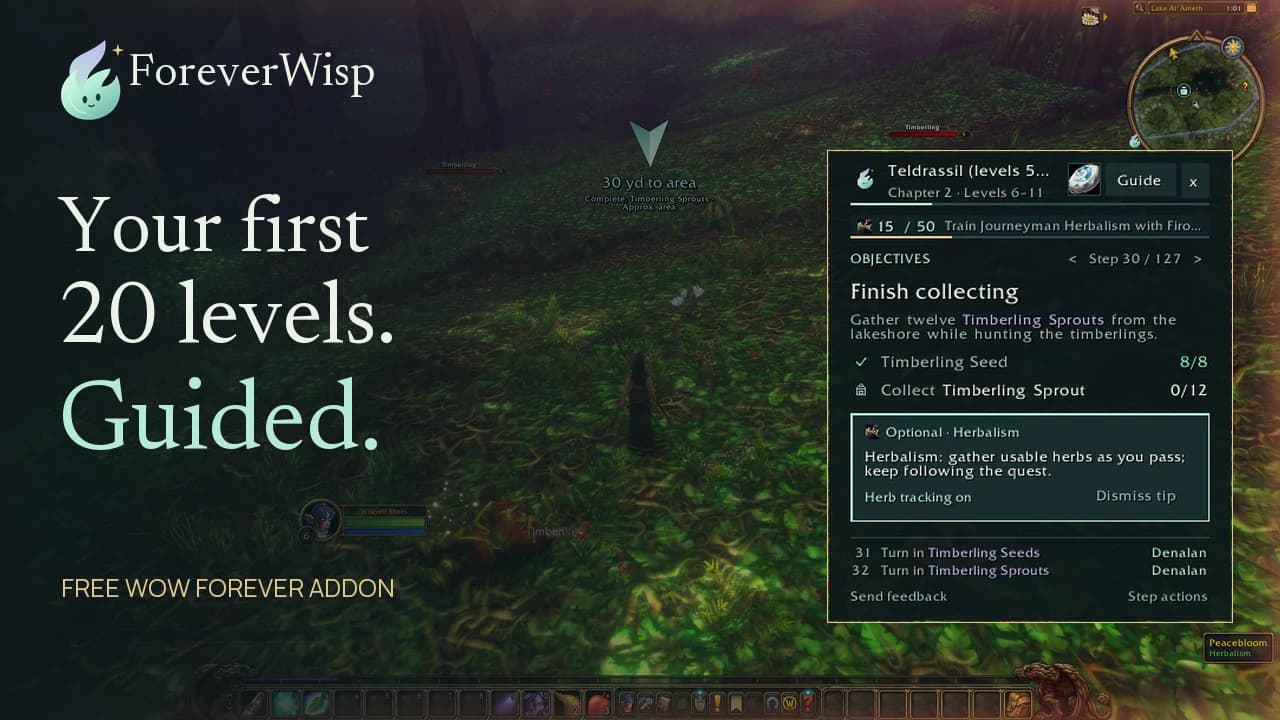
A marker tells you where something is. Wisp also connects your quests into a sequence, from the first pickup to the trip back.
- 01
Know your next step
See the current task and follow directions to your next destination.
- 02
Make the most of each stop
Keep compatible nearby objectives in view, with progress as you play.
- 03
Keep your journey moving
Return to hand in, then continue into your next chapter.
Gather along the way
Free Mining, Herbalism and Skinning guides through skill 150. Follow them on their own or alongside a supported starter route.
Leave room for your party
Optional sharing shows who still needs kills or items. Everyone keeps their own progress, with controls to wait for friends.
YOUR CHARACTER. YOUR NEXT CHAPTER.
Start free.
Keep the journey going.
Try Wisp with your character’s starter route, or explore the continuation if you’re already around level 20.
Eight ways to begin.
FreeStarting routes for Alliance and Horde, towards level 20.
- Quest order, directions and objective progress
- Mining, Herbalism and Skinning through skill 150
- All eight starter routes in one download
Routes and XP pacing are being optimised and refined. Coverage & known issues.
The road beyond.
Pre-order your faction’s 20–60 guide. Get the released 20–35 band now, with later bands included as they release.
- 20–35 in-game guide available now
- Online reader included
- One-time purchase, no recurring fee
20–35 is being optimised and refined; full route and class playthroughs remain in progress. Levels 35–60 are not yet released. View each guide for pricing, coverage and requirements.
Sources & review notes 19 references · dated author information
Added leveling guide addons on 21 October from their authors’ pages: RestedXP’s Forever shop page and October 9 update, the RestedXP Guide 4.11.26 Forever file, TUGs for Guidelime, Guidelime 6.008 and Forever Leveling Guide 4.52. Questie’s packaged release was rechecked on 29 October: 12.3.1 with QuestieDB 1.0.9. Detailed setup and troubleshooting now have a dedicated Questie guide. Quester 0.6.1 and Bleakfiber 1.1.12 retain their October 13 checks, and the separate Questie Forever fork retains its September 20 check. Features, coverage and fixes are author-reported. This is not an in-game compatibility test or a claim of complete quest coverage.
- Quester Forever: author’s features, setup and limitations ↗Community report · checked 2026-10-13
- Quester Forever 0.6.1, released October 10 ↗Community report · checked 2026-10-13
- Questie: official project and supported clients ↗Community report · checked 2026-10-13
- Questie 12.3.1 with QuestieDB 1.0.9: October 26 release ↗Community report · checked 2026-10-29
- Questie 12.1.0 + 1.0.6: CurseForge file supporting Forever 1.60.1 ↗Community report · checked 2026-10-13
- Questie 12.0.4 and QuestieDB 1.0.5: October 6 Forever data update ↗Community report · checked 2026-10-13
- Questie installation guide: general extraction and folder checks ↗Community report · checked 2026-10-13
- Questie team: downloads, configuration and bug-report instructions ↗Community report · checked 2026-10-13
- Separate Questie Forever project: historical beta patch v27 listing ↗Community report · checked 2026-09-20
- Bleakfiber: Forever quest tracker features and commands ↗Community report · checked 2026-10-13
- Bleakfiber 1.1.12: October 12 release and tracker visibility controls ↗Community report · checked 2026-10-13
- RestedXP: Forever Leveling Guides, stages and coverage ↗Community report · checked 2026-10-21
- RestedXP: October 9 Forever update, 1–35 guides finished ↗Community report · checked 2026-10-21
- RestedXP Guide 4.11.26: Forever file and built-in free routes ↗Community report · checked 2026-10-21
- TUGs for Guidelime: Forever coverage and requirements ↗Community report · checked 2026-10-21
- Guidelime 6.008: guide addon with a Forever file ↗Community report · checked 2026-10-21
- Forever Leveling Guide 4.52: author’s features, October 19 ↗Community report · checked 2026-10-21
- CurseForge: “leveling guide” addons by total downloads ↗Community report · checked 2026-10-21
- ForeverWisp: quest guidance, included guides and release availability ↗Official · checked 2026-10-20
Gameplay footage was recorded on 30–31 October 2026. Game imagery © Blizzard Entertainment.
TAKE WISP WITH YOU
Your next quest is waiting.
One download. Eight starter routes. A little less guesswork.