WRITTEN ARTICLE · BETA TROUBLESHOOTING
WoW Forever beta known issues: crashes, lag and fixes
Check the October 8 beta issues, including Hunter pet stat displays, profession icons and pending textures, alongside dated troubleshooting history.
October 8: current known issues
Hunter Ferocity can fail to update the pet’s displayed critical chance. Blizzard says this is a visual bug only. Some profession-window icons also appear broken.
Skyborne Druid Bear and Travel textures have been updated; Cat textures and selected Zephras creatures, mounts and pets are still awaiting a future build.
The patch also confirms fixes including the Cat Form health issue, Retribution Aura’s spell-power source and faster Taillasher Egg respawns. Older reports below retain their original dates. An old issue missing from the new list is not, by itself, proof that it was fixed.
In this article

Artwork © Blizzard Entertainment
September 24 history: party changes and tracking reports
On September 24, Blizzard listed party-composition changes moving players between world instances as an issue. If you suddenly cannot see a friend, check party state before blaming your route or resetting guide progress.
That build also had gaps in cooldown tracking. Use the separate setup guide for its current coverage. Earlier incident reports below describe their stated dates, not the current status of every server.
22 September client build 69977: Mac and controller fixes
Blizzard posted a Beta Client Update on 22 September introducing WoW Forever 1.60.1 build 69977. Kaivax lists fixes for some display and stability issues on Macs, controller navigation in character selection when launching with a gamepad active, interacting with quest-giving items on a gamepad, and other fixes not testable in-game. Exit the beta and update through the Battle.net app to receive it. Blizzard says the next full weekly update arrives on 24 September.
Early player replies to Wowhead’s report describe mixed Mac results, with a green tint fixed but shadow artefacts persisting for some. Those are unverified and had no Blizzard response when checked. If a Mac problem persists on the new build, the Secondary Lighting workaround below still applies.
The developer explanation: disconnects, loot lag and restarts
Tom Ellis explained three separate launch problems in a September 18 post, covered by Wowhead on September 19. Login traffic hit a service-protection limit despite spare processing capacity. Slow database responses then affected actions such as looting and accepting quests. Empty maps also failed to shut down properly, consuming server resources.
Ellis describes increasing connection capacity, refreshing database statistics and deploying a map-cleanup fix through restarts. He stresses that the beta uses a test environment. These explanations concern those launch incidents. They do not establish that every current delay is fixed, or that launch will have the same infrastructure limits.
FPS gets worse as you play? Keep that separate from network lag
In a September 19 reply about falling frame rates, Ellis says the team had also seen the problem internally and was investigating. He reports that restarting the client helps the reported symptoms, while a reliable internal reproduction was still missing. This is an investigation update, not a released fix for every performance issue.
If you see a similar pattern, record your FPS near the start of a session and again when it deteriorates. Note the zone, elapsed time, graphics settings, hardware and client build. When you are somewhere safe, close and reopen the client and compare. Keep a crash report separate from a slow frame-rate report.
Two more beta questions: world refreshes and Warrior buttons
A five-minute world refresh notice is part of the game’s phasing interface. Our illustrated explainer shows the notice and its controls. It is a different situation from a frozen client or a login disconnect.
We have also updated the Warrior guide with September 20 stance-macro reports and Blizzard’s separately confirmed Heroic Strike and Cleave spell-queue issue. The guide distinguishes the player report from the official issue.
September 19: stuck on Among the Faithful?
Our separate quest report covers the missing dresser, the workarounds players tried overnight and their mixed results. It includes a video reference for checking the quest route.
Start with the symptom, not a reinstall
An error during beta can come from the game, an addon or a connection problem. Record what you were doing and the first error before changing several settings at once. Keep a note of your client build so a later result can be compared fairly.
This page is a dated reference, not a live server-status service. Use the original Blizzard thread for the latest changes; a planned fix does not mean the build installed on your machine contains it.
Crashing when entering the world? Try Secondary Lighting on Fair
September 18 reports describe a workaround for crashes when logging into a character: change Secondary Lighting to Fair before entering the world. Warcraft Tavern reports success, and Mac players describe the same change on the beta forum. This does not establish a fix for every crash or configuration.
Record your original setting before changing it. If the client or operating system keeps crashing, stop repeated attempts and report the symptoms with your hardware, OS and client build. We have not tested this workaround ourselves.
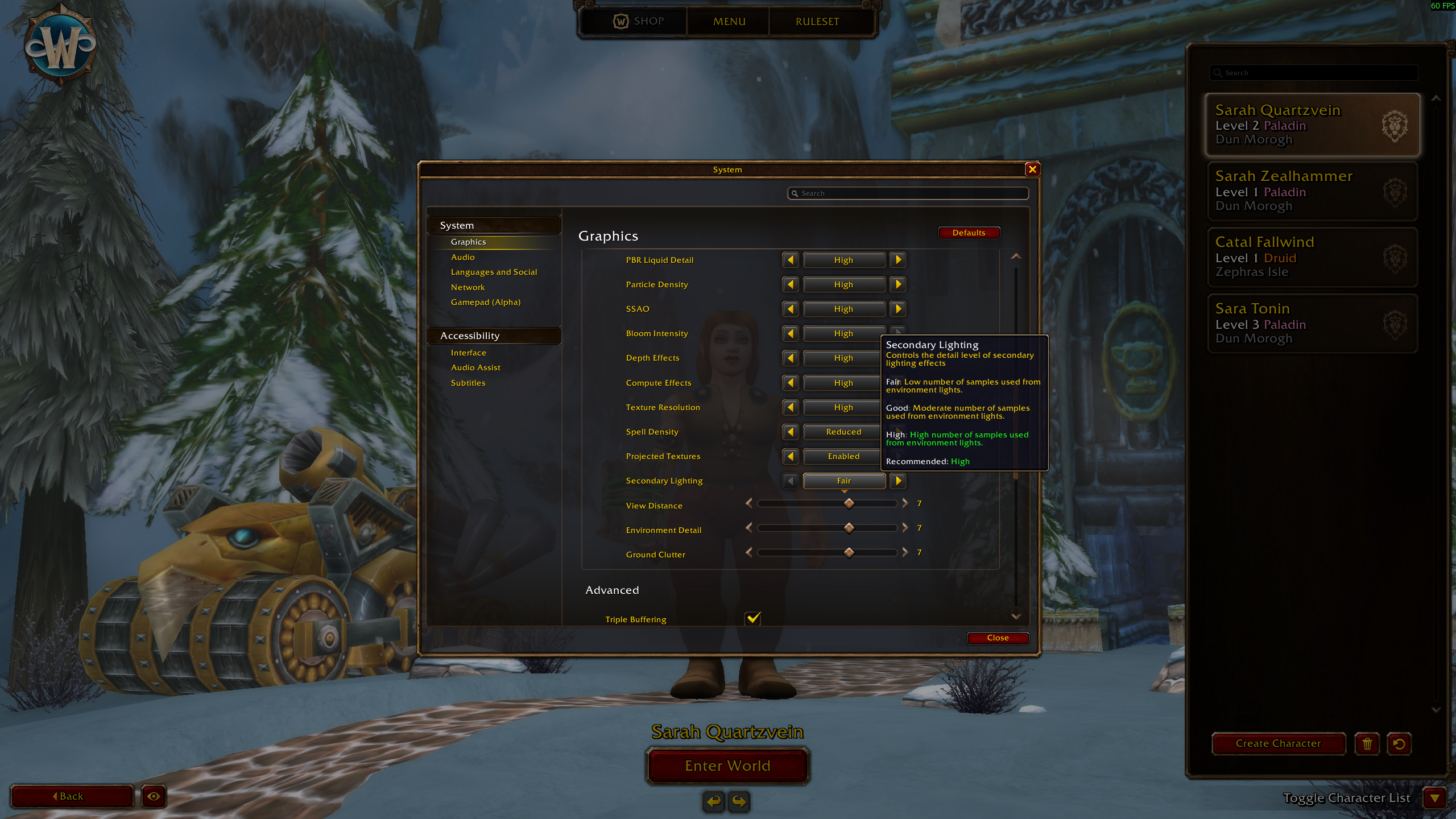
Screenshot: Passion / Warcraft Tavern. Game interface © Blizzard Entertainment.
- Stay at character selection and open Menu.
- Open the Graphics settings and find Secondary Lighting.
- Set Secondary Lighting to Fair, then close the menu and try entering the world.
- Compare with your previous result before changing other settings.
September 18: beta lag and high ping reports
European beta players report high latency, freezes and interrupted sessions. Some say changing network routing with a VPN helped, while others still experienced freezes. These are community observations, not an official diagnosis or a confirmed universal fix.
In a September 18 reply to European lag reports, Tom Ellis says a routing issue should be largely fixed after traffic was redirected. That updates the early community reports, but does not diagnose every later connection problem. High ping alone does not establish that your PC or addon is responsible.
What to check before changing your setup
Start by separating delayed game responses from low frame rate. Note the displayed latency, frame rate, time and region when the problem occurs. Compare a short session with background downloads paused, then try the same activity with addons disabled.
Change one thing at a time and keep your settings backed up. If many players experience the same issue simultaneously, repeated reinstalls are unlikely to be a useful first response. Check official notices and report reproducible symptoms.
- Record Home and World latency if both are displayed, plus the client build.
- Note whether chat, movement, combat or the entire client stops responding.
- Keep a brief before-and-after record for each change.
- Do not delete saved settings as the first troubleshooting step.
Will a VPN fix Forever beta lag?
There is no guaranteed fix established by the reports we reviewed. A routing change can have different results for different connections, and a VPN can also make latency worse. We do not recommend buying one on the strength of these anecdotes.
If you already use a trusted VPN and choose to compare it, test the same activity for a similar period with and without it. Revert the change if it does not help; an improved session is not proof that the beta issue is resolved.
Selected issues on Blizzard’s September 18 list
These selected reports describe the September 18 list. Their status labels are historical; use the newer dated updates above when checking the current build.
| Area | Reported issue | Listed status |
|---|---|---|
| Interface | Barber-chair errors and minimap positioning | Known issue |
| Social | Character friends disabled | Known issue |
| Waylaid Crates | Stack-size and essence turn-in problems | Next-build fix planned |
| Legacy | Opening with Y below level 25 can cause errors | Known issue |
| Combat | Incorrect glancing-blow values | Work in progress |
| Guilds | Charter signatures can fail | Temporary zero-signature hand-in |
| Exploration | Coldridge Valley map reveal | Next-build fix planned |
| Cooldown Manager | Implementation differs by class | Work in progress |
| Druid | Bear Form multiplies armor bonuses from buffs and consumables | Known issue |
| Ability queue | Heroic Strike, Cleave or Raptor Strike can disable the spell queue window | Known issue |
| Mage | Damage during Arcane Missiles can produce an untruncated bolt | Known issue |
| Resurrection sickness | Incorrect duration at lower levels | Known issue |
Beta missing, Install greyed out or unable to enter?
Confirm access before diagnosing addon problems. Blizzard directs players to select Forever Beta under In Development in Battle.net. Eligible bundle access can take up to 30 minutes and may require a launcher restart.
Check the full access guide below before purchasing anything or following a workaround. An installation folder alone does not establish that your account can enter the test.
How to distinguish game errors from addon errors
Warcraft Tavern’s corrected report describes settings inherited from a previous beta installation. Check which addons are enabled on your own setup before assuming a clean interface. This is a reported behaviour, not a guarantee for every installation.
Our suggested isolation procedure: note which addons are enabled; temporarily disable them for the test; repeat the same action; then re-enable one at a time. Preserve settings and backups. If the error also occurs without addons, do not blame Wisp merely because it was installed earlier.
Record the first failing action, rather than collecting many later errors that may all have the same cause. Changing a .toc number can remove an outdated label without fixing an incompatible API.
Class tests need the known-issue context
Blizzard lists Starshards/Twilight Focus, Paladin Vengeance and Holy Strike, Firestone tooltips and pet-stat displays among the affected areas. Consult the original list before judging a talent from a single result.
Keep the same equipment, level and target when comparing choices. A display problem and an actual damage calculation problem need different evidence; note which one you observed. Our nine talent proposals include beta-testing notes and remain untested theorycraft.
Crashes, disconnects and latency: what to record
For a crash, record the operating system, graphics hardware, client build and exact trigger. Follow the technical-support link in Blizzard’s launch article. Do not delete all saved settings as your first diagnostic step.
For a disconnect, record the time and whether it happened at login, during loading or in the world. For latency, distinguish delayed actions from low frame rate. Avoid presenting an untested VPN, graphics tweak or addon as a guaranteed fix.
We have not confirmed a universal Mac-crash or EU-latency fix. A workaround reported by another player needs a matching environment and repeatable test before we recommend it as reliable.
A useful report you can copy
Use the following fields. Remove account identifiers, private chat and personal filesystem paths from screenshots or logs before sharing them.
| Field | What to include |
|---|---|
| Environment | Client version/build, OS and relevant hardware |
| Character context | Class, level, zone and affected quest or talent |
| Reproduction | Short numbered steps, expected result and actual result |
| Addon comparison | Whether the same steps fail with addons disabled |
| Evidence | First error, relevant screenshot and observation time |
Related reading and guides
Sources and review notes
- Blizzard: new known issues, October 8
- Blizzard: October 8 beta development notes
- Blizzard: Forever beta development notes, 24 September
- Blizzard / Kaivax: Beta Client Update, 22 September (build 69977)
- Tom Ellis: beta launch disconnects, database delays and restarts, 18 September
- Tom Ellis: FPS degradation under investigation, 19 September
- Tom Ellis: European routing mitigation, 18 September
- Blizzard / Kaivax: beta known issues, updated 18 September
- Blizzard: the Forever beta is now live; access and first-week content
- Warcraft Tavern: previous beta addons and keybinds, corrected report
- EU beta players: latency and mixed VPN workaround reports
- Warcraft Tavern / Passion: login-crash workaround and settings screenshot, September 18
- Beta forum player report: Secondary Lighting set to Fair
Updated October 9 with Blizzard’s new October 8 issues and confirmed fixes. Older incident reports and issue tables remain explicitly dated history, not a statement that every old bug is still present or resolved.