WRITTEN ARTICLE · MAC BETA TROUBLESHOOTING
WoW Forever Mac graphics: green shadows, FPS drops and what to check
Mac beta players still report green shadows and FPS drops after zone changes. Check the current reports, test settings carefully and separate graphics issues from addons.
Mac graphics reports are still mixed
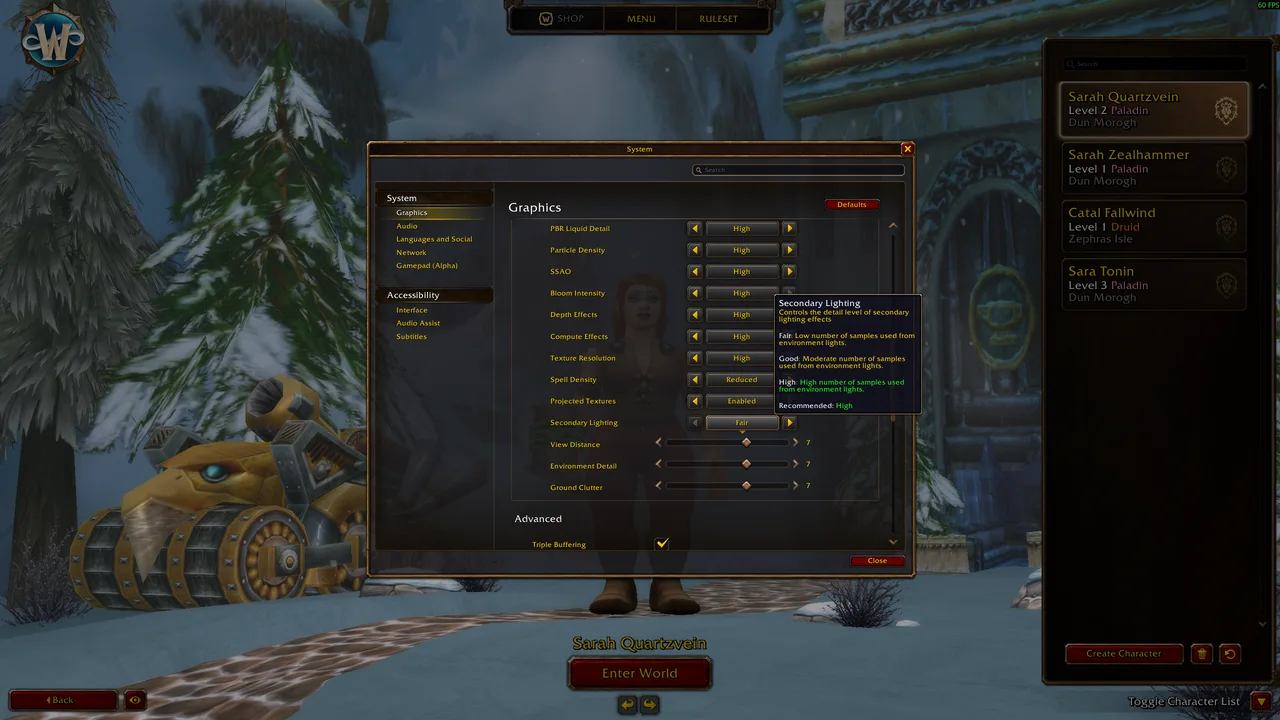
The Forever beta’s long-running Mac graphics thread has fresh reports of green-tinted shadows and frame-rate drops after changing zones. One player describes recovering performance by changing Secondary Lighting and then returning it to Fair. Another reports that earlier setting changes helped on an M1 Max.
Those different results are worth keeping separate. A workaround helping one machine does not establish that the issue is fixed on all Macs, and a new report does not mean every Mac is affected. Record your client build before comparing your experience with a post.
In this article
Screenshot: Passion / Warcraft Tavern. Game interface © Blizzard Entertainment.
What has Blizzard actually confirmed?
Kaivax acknowledged the detailed reports on September 22 and said multiple analyses and potential fixes for Mac issues were underway. That is an official acknowledgement of the investigation, not a new October 5 promise or a confirmation that every reported graphics fault is resolved.
The opening post is maintained by a player and separates observations, retired problems and hypotheses. Read the dates and build numbers attached to a specific symptom. Do not treat the entire thread as Blizzard’s official known-issues list.
Start with a small, reversible comparison
Write down your current graphics settings before changing them. Test in a safe, stationary location and keep the camera, resolution and scene as similar as possible. Compare one setting at a time so you can tell which change helped.
Secondary Lighting on Fair is a previously reported login-crash workaround. It is a reasonable setting to check if your symptoms match, but it is not a universal best-settings preset. If your client is already stable, there is no reason to copy every setting from someone else’s machine.
For a zone-change problem, note the starting zone, destination, weather and whether performance recovers after restarting normally. Avoid judging the result solely during a flight or in a busy town, where several things change together. Stop repeated attempts if the whole machine locks up.
Could a leveling addon be responsible?
The existence of a graphics bug report does not diagnose your own installation. For a useful addon comparison, disable addons from the character-selection list, log into the same character and compare the same location. Then enable them individually to narrow down a repeatable difference.
If the symptom remains with every addon disabled, include that result in your report. If it appears only with a particular addon enabled, record that addon’s version and the exact action that triggers it. Keep your settings and progress files while testing. Deleting them makes the comparison harder and may remove information you wanted to retain.
We have not benchmarked Wisp on these affected Mac configurations. Updating a guide addon is not a substitute for a client graphics fix.
What makes a useful beta report?
A short reproducible description is more useful than a list of settings changed all at once. Include the following, then say whether the problem happens every time or only occasionally.
- Mac model and chip, macOS version and WoW beta build.
- Zone, approximate location, weather and the action immediately before the problem.
- Resolution, render scale and the graphics settings you changed.
- Whether the symptom remains with addons disabled.
- A screenshot for colour or shadow corruption, or a short video for flickering.
Related reading and guides
Sources and review notes
- Beta forum: latest Mac graphics reports and test notes
- Beta forum: FPS loss after changing zones, October 4–5
- Beta forum: one M1 Max player reports improved results, October 5
- Blizzard / Kaivax: Mac issue investigations, September 22
- Warcraft Tavern: Secondary Lighting workaround, September 18
Checked October 5 against current player replies and the dated September 22 Blizzard acknowledgement. We have not reproduced these graphics issues or benchmarked the proposed settings.