WRITTEN ARTICLE · LANGUAGE SETTINGS AND LAUNCH POPULATION
WoW Forever language settings and quiet cities: what to check after launch
Check Preferred Online Language in WoW Forever, find the Apply button and understand what Blizzard has said about areas that feel too empty after launch.
Check your language preference before assuming the realm is empty
Blizzard asked players to review their language and social settings at launch. Its screenshot shows separate Text, Audio and Preferred Online Language controls under Options > System > Languages and Social. Check the online preference even if your menus already use the language you expect.
If you change the preference, use its Apply button, then log out and back in as Blizzard advises. Read any restriction the game displays before confirming.
In this article
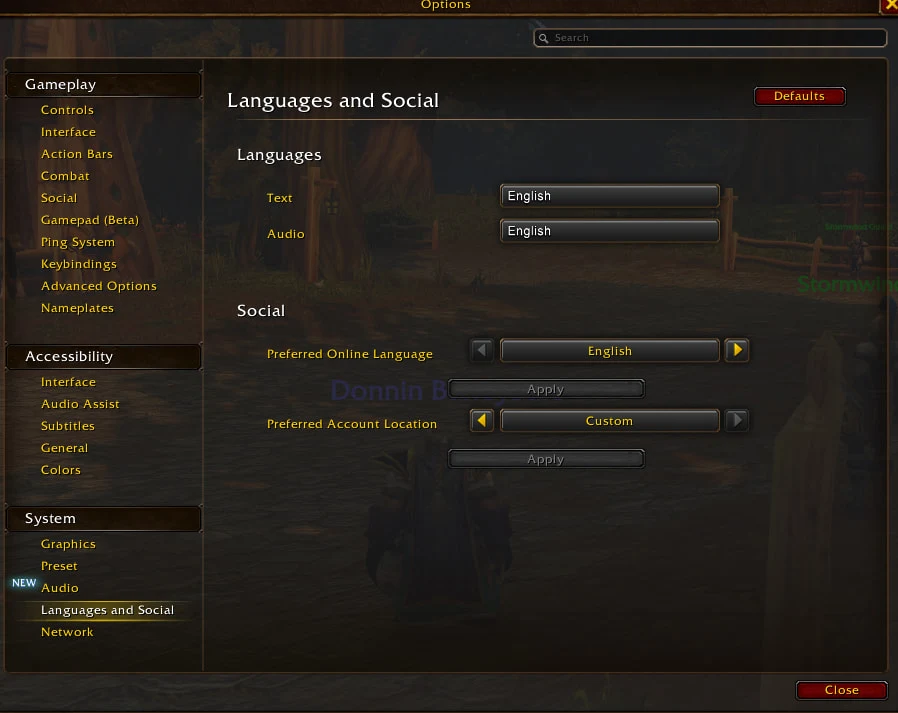
Screenshot © Blizzard Entertainment, published by Kaivax.
What the screenshot helps you find
| Setting | What to check |
|---|---|
| Text and Audio | Check these separately from the online language preference. |
| Preferred Online Language | Review the selected language and the Apply button directly underneath. |
| Preferred Account Location | This is a separate control. Do not change it just because the language setting looks wrong. |
Changing the preference is not a guaranteed population fix
Players replying to the official thread reported unexpected defaults, a 24-hour change cooldown and quiet areas after changing language. Those are community reports, not a confirmed explanation of how every layer is assigned.
Our advice is to choose the language you want to play in and avoid repeatedly switching it as a population experiment. If the preference saves but the problem remains, note what happened and report it rather than assuming another switch will solve it.
Blizzard has acknowledged the quiet-area problem separately
In a November 5 reply at 06:35 UTC, Aggrend said some areas were not feeling as populated as intended and that Blizzard planned to adjust the numbers. The reply did not give a player count or confirm a completed fix.
A quiet city is not enough evidence to judge how many people are playing the whole game. The local population you can see and total player demand are different things. We would not make a new character or abandon a leveling route based on that observation alone.
If you are trying to level with friends
Compare your settings and where you are standing, then check that you are actually grouped. Keep the question specific: are you unable to form a party, unable to see a party member, or simply seeing few strangers nearby?
Those symptoms can need different fixes. Invite-A-Friend party restrictions received a separate hotfix, while Wisp’s party tools show guide progress. Neither should be treated as a universal fix for the game’s population or layering behaviour.
Related reading and guides
Sources and review notes
- Blizzard: language and social settings, November 4
- Blizzard: Aggrend on areas feeling underpopulated, November 5
Checked November 5. Settings are shown in Blizzard’s official screenshot. Cooldown and empty-area experiences are attributed to forum replies, not presented as a confirmed cause or a guaranteed workaround.